

During power outages, Generac’s home backup generators can provide power to your family. However, your generator will need to be maintained over time to achieve the best results. The question now is, how do you keep it going?
How to reset the Generac generator after an oil change?
- Regular maintenance and oil changes help to keep your generator running smoothly. It is recommended that you change the oil in your generator after the first month or 50 hours of use.
- Turning on the generator first allows you to reset the maintenance after an oil change. Then press the ENTER key to turn it off.
- It is mostly dependent on the model or age of the generators; you may not see the ENTER button on your generator. In this case, the generator can be set to switch off.
- You must wait 30 seconds after turning it off. After 30 seconds, switch your generator to MANUAL mode. The generator should then be turned on. If the generator starts, you should test it and run it for five minutes.
- Once it has been running for 5 minutes, turn it off again. Then, please wait 30 seconds more to ensure that it is completely turned off. The unit can then be set to AUTO.
How to reset the yellow light on the Generac generator?
Outside, there are three different lights on the Generac generators. Each light has a unique meaning. They come in three different colors: red, green, and yellow.
With the green light, everything is fine. When the light turns yellow, the system needs to be serviced. The yellow light can also cause the generator’s battery charger to lose power.
It is normal to notice a flash of yellow light once or twice a year. Remember, this is only a reminder to maintain your generator.
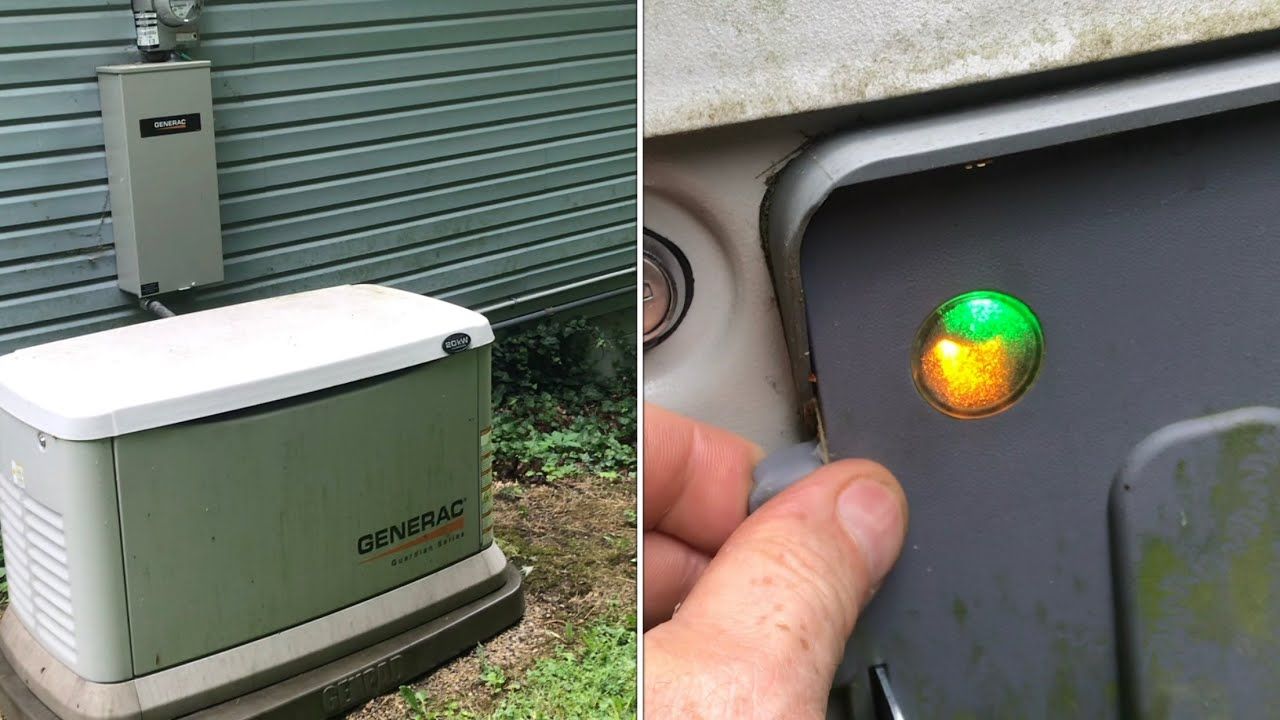
Here’s how to reset your Generac generator’s yellow light:
- First, determine the age and model of your generator.
- If the generator is new, resetting the yellow light will be simple.
- It is preferable first to turn off the machine.
- Then press the Enter key twice. Make it slowly and with care.
- Then, to activate the machine, press AUTO.
How to reset the red light on Generac generator?
The red light in Generac generators serves a different purpose than the yellow light. If you see a red light, you should interpret it as a fault rather than a yellow light.
It has been inaccurate and requires maintenance. Correcting the error that causes a generator’s light status to be red is preferable. If you don’t fix it, the generator will stop working.
Here’s how to reset your Generac generator’s red light:
- Click the OFF button.
- Then click the links provided below. (Up, up, ESC, down, up, ESC, up ENTER)
- Use the up button to navigate the word ‘DEALER’ and press ENTER.
- Then, for DEALER, select the EDIT option.
- Using the ‘Up’ button, look for reset maintenance.
- Once you’ve found the reset option, press ENTER.
- To see the display, press the ESC button.
You can learn about the generator’s operation by observing that it starts approximately 10-15 seconds after a power outage.
It takes another 10-15 seconds to fully power up. It will complete with full power within 30 seconds of a dropout, less time than it may take to locate a flashlight.
Conclusion
A Generac generator is now an absolute necessity. Having a generator in your home for various situations is very convenient. Maintaining a Generac generator is not as difficult as it appears. You should always keep a maintenance kit to check every part of the Generac generator as needed. It will then be simple and practical to reset your generator’s maintenance. Properly charging a Generac generator battery is also good generator maintenance practice.
FAQs
How to remove a Generac generator’s front panel?
Two bolts at the top of the Generac generator must be removed to remove the front panel. Remove them before pulling the panel up. The battery can then be removed, but be careful not to touch the leads because they still need to charge.
What oil does a 22kw Generac generator require?
The Generac manufacturer recommends Generac Full Synthetic Motor Oil 5W-30. It should be used with the 22kw Generac Generator for the best maintenance results.
How do I turn off my Generac generator’s yellow light?
First, turn off the machine. Then, tap “enter” twice more to return it to auto. The yellow light should blink at least once a year.






Write Your Review
No reviews yet. Be the first to share your experience!